← Back to selected work

Finding the friction in everyday interface copy, then making the language clearer, calmer, and easier to act on.

Role
Project lead
Duration
About one year
Scope
15+ product lines
Reach
Worldwide / 50+ languages
One small word.
One less wobble.

Docs / changing your own role

Before

Once removed, you will lose your permission access. Continue?

Confirm
After

Once changed, you’ll lose your current permissions.

Change

Good design is often the thing you barely notice.

Across Lark’s product ecosystem, small pieces of interface copy were asking users to do unnecessary interpretive work. My role was to identify those friction points and refine the language so it became clearer, calmer, and easier to act on.

Maximum usefulness, minimum clutter. The best line of product copy should make the next step feel obvious, not perform a little monologue about itself.

A workplace with many rooms.

Lark brings messaging, meetings, docs, calendar, email, and workflows into one connected workplace. A small language decision can therefore travel across very different product contexts—and across markets.

See Lark’s product overview

One voice across many product lines.

I led the project across a team of content designers, each embedded in different Lark features. My job was to gather their feature-level knowledge, lead the discussions, and make the final decisions so the system worked across the product while still feeling consistent.

That meant many rounds of discussion with designers, product managers, researchers, engineers, and localization teams. Product behavior, deployment constraints, and cultural references all shaped the language—not only what sounded best in English.

Content designProductDesignResearchEngineeringLocalization

Test the words where they actually travel.

The content audit invited internal Lark users based around the world who used the product in different languages. We showed participants the old and new versions through A/B testing, then compared reaction time and satisfaction.

The project ran for about a year. Changes were released gradually through Lark’s weekly product versions, which gave the team room to learn and refine instead of treating the work as a single rewrite.

01Worldwide participants
02Old versus new A/B tests
03Reaction time + satisfaction
04Weekly gradual releases

The work, word by word.

01

Use the word that describes the action—and the context

Admin member management

“Terminate” can imply ending someone’s employment and had received negative feedback from overseas users. “Delete” is more neutral, operationally accurate, and aligned with how this setting actually works.

Before

Terminate

After

Delete
02

Make the next step feel like an invitation

Meeting audio check

The original wording sounded demanding and missed its article. “Try another device” gives the same instruction in a more natural, encouraging voice.

Before

No, test next device

After

No, try another device

03

Name the change that is actually happening

Docs permission confirmation

A user changing their own role is not removing themselves from a document. This revision matches the real action, preserves accurate context, and uses a clear verb-led button.

Before

Once removed, you will lose your permission access. Continue?

Confirm
After

Once changed, you’ll lose your current permissions.

Change
04

Make menu items complete thoughts

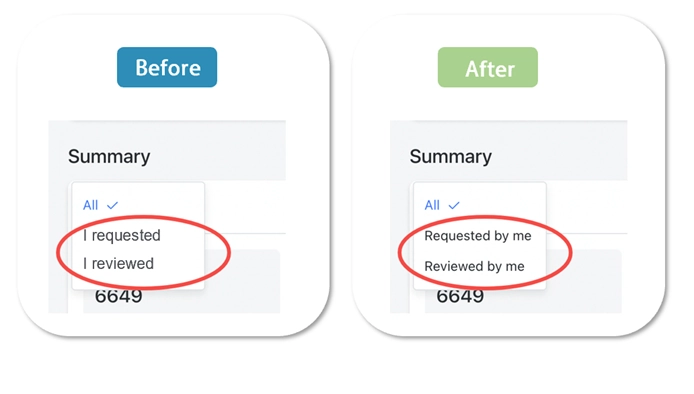
Contract filter

In a dropdown, “I requested” reads like the start of a sentence. Placing the task first makes the options scannable and grammatically complete.

Before and after Lark contract filter menus, changing I requested and I reviewed to Requested by me and Reviewed by me.
Original project artifact · before and after
05

Say only what the icon hasn’t already said

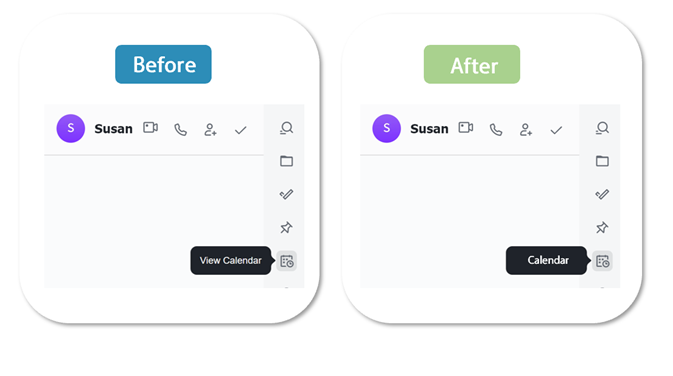
Messenger tooltip

A familiar calendar icon already signals the action, so “View” is extra furniture. The shorter label avoids repeating what users can see.

Before and after Lark Messenger tooltips, changing View Calendar to Calendar beside the calendar icon.
Original project artifact · before and after
06

Leave room for time to do its thing

Minutes detail

Different time formats need different prepositions. “Created” stays correct whether the detail is followed by a date, a time, or both.

Before

Created at

After

Created

07

Plain English is a kindness

Profile menu

PSTN is technically precise but not commonly understood. “Phone Call” asks less of the user and tells them exactly what they are selecting.

Before

PSTN

After

Phone Call

08

Choose the word for this job, not a nearby one

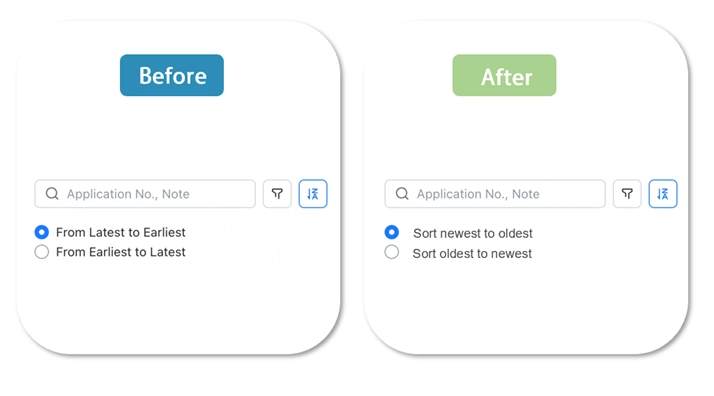
Expense sorting

“Newest” describes submission dates more precisely; “latest” can suggest what is fashionable or recent in a broader sense. The revision also follows the English style guide’s sentence-case convention.

Before and after Lark expense sorting controls, changing Latest and Earliest labels to Sort newest to oldest and Sort oldest to newest.
Original project artifact · before and after

Six ways to make an interface step back.

  1. 01Be clear and concise.
  2. 02Do not repeat information users already have.
  3. 03Pick words that fit the scenario, not only the dictionary.
  4. 04Make actions explicit and consistent.
  5. 05Write from the user’s point of view.
  6. 06Prefer familiar language over internal shorthand.

The work is minute.
The accumulated effect is not.

Product language works at the scale of a single verb, preposition, or menu label. The work is minute; the accumulated effect is not. Each adjustment helps an interface step back, so the person using it can step forward.

The work streamlined language across product lines and established a more consistent foundation for the product. It also led into the next project: defining Lark’s voice and tone so the product could feel more personal, coherent, and fully formed.

Return to selected work